The Stocky replacement that brings your purchase orders and reorder points with it.
Send us your Stocky export. We bring your purchase orders, ordered costs and reorder points into Binly for free, so you can check every number before anything touches your live store. Stocky's CSV export may not stay available for long, so migrate while you still can. We also set up your suppliers from the vendor names on those orders.
Free plan to start. No card required.
We do the migration. You check our work.
Your Shopify stock is already right. The move is about the paperwork behind it: what you ordered, who you ordered it from, and the cost you agreed at the time. None of that lives in Shopify.
Step 1
Export from Stocky
Pull your purchase orders and history out to CSV while the export still works. Sooner is better.
Step 2
Send it over
Email us the file, or upload it in Binly yourself. Whichever is quicker.
Step 3
Look it over
We match every line to your Shopify products, then hand the whole thing back for you to read before anything moves. Nothing goes live in your store until you approve it.
Two minutes
Watch a count run start to finish
Phone in one hand, laptop on the bench. This is the app itself, not a slide deck.
Hosted on YouTube. Nothing loads from YouTube until you press play.
Count
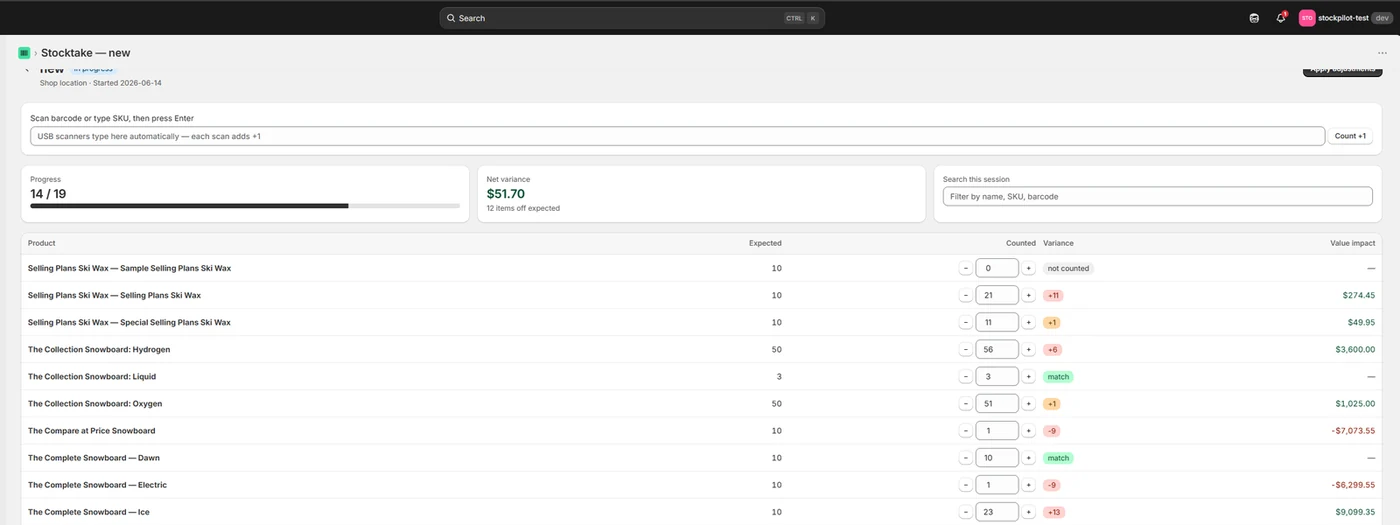
Count the shelf, not a spreadsheet
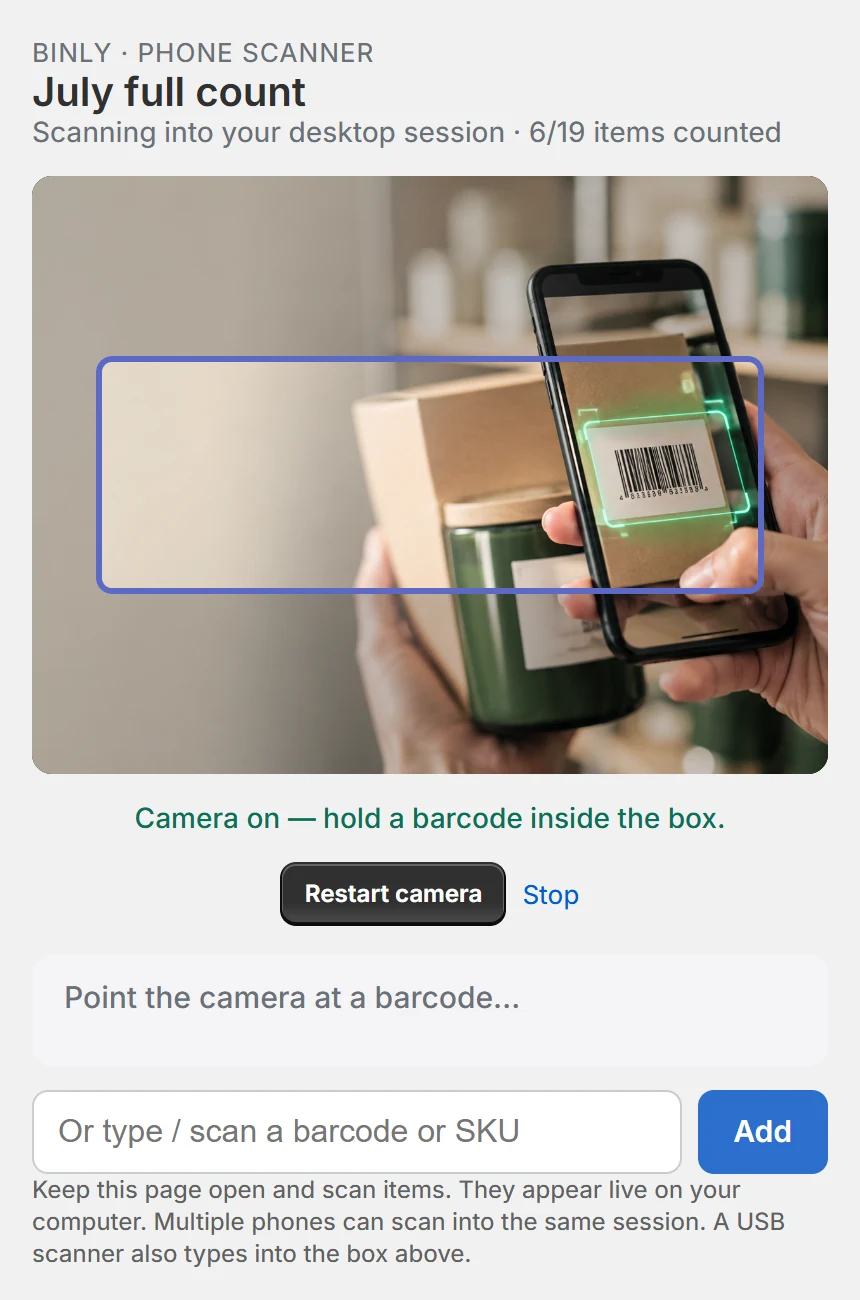
Scan with the phone in your pocket or a USB scanner on the counter. The desktop session updates as each item lands.
- Variance and dollar impact show up line by line while you count.
- Count one aisle, one vendor, one tag, or the whole catalog.
- Shopify stock only moves when you press apply.
On Pro, several phones can scan into the same session, so two people can work opposite ends of the shop.
Buy
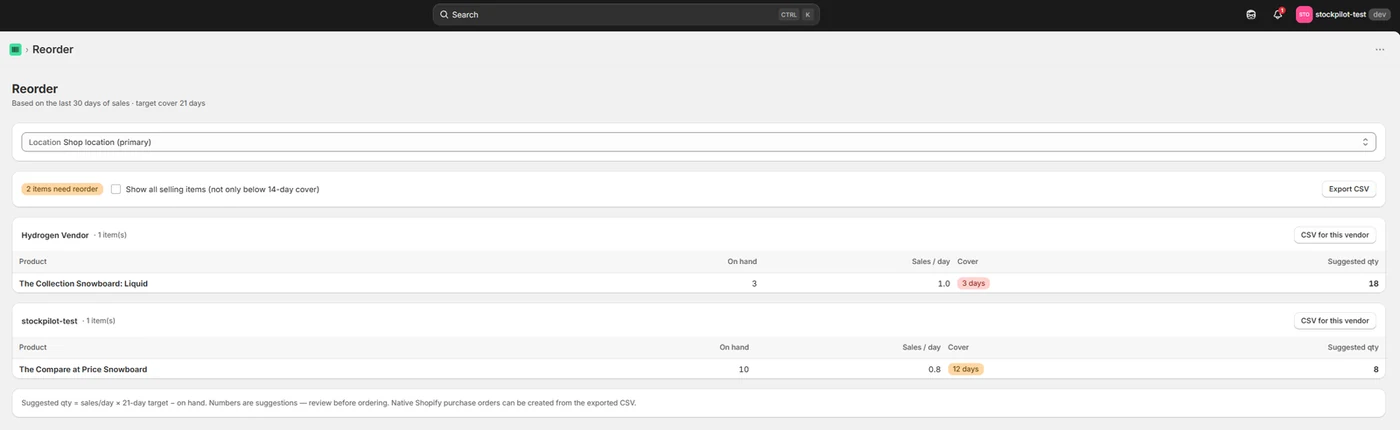
Reorder before the shelf goes empty
Binly reads your sales and the median of your own supplier lead times, then tells you the date to order by, not just a quantity.
- Purchase orders with partial receiving and per delivery costs.
- Supplier price lists, and a check of every invoice against the order.
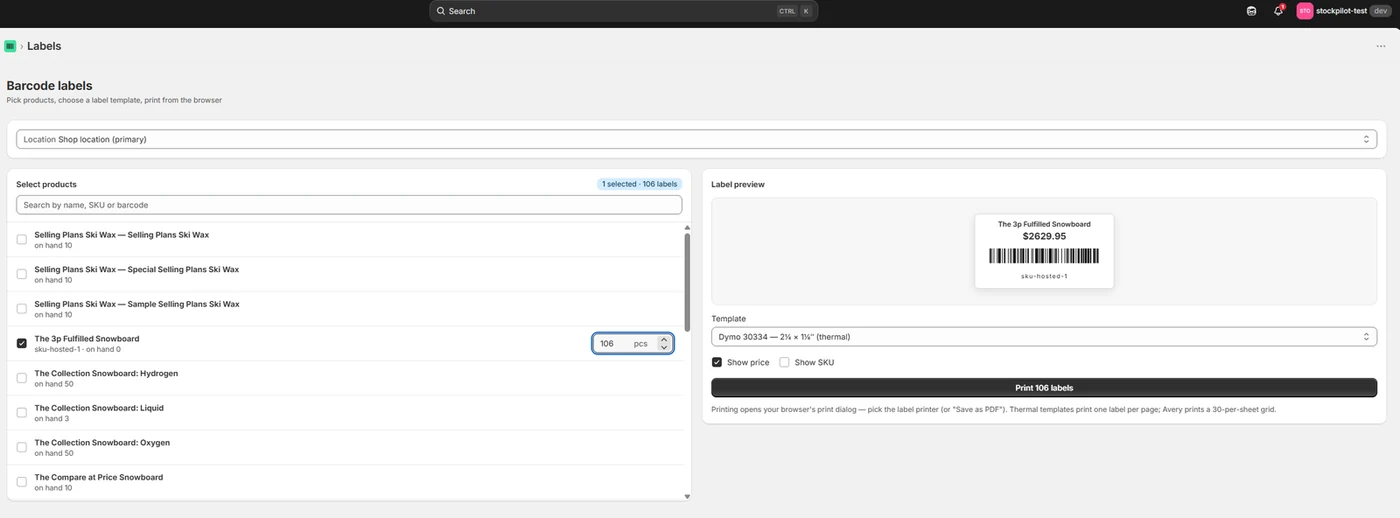
- Barcode labels print straight from the order you just received.
Order-by date is the last day an order can go out and still land before the shelf empties. The maths is on the screen, so you can argue with it.
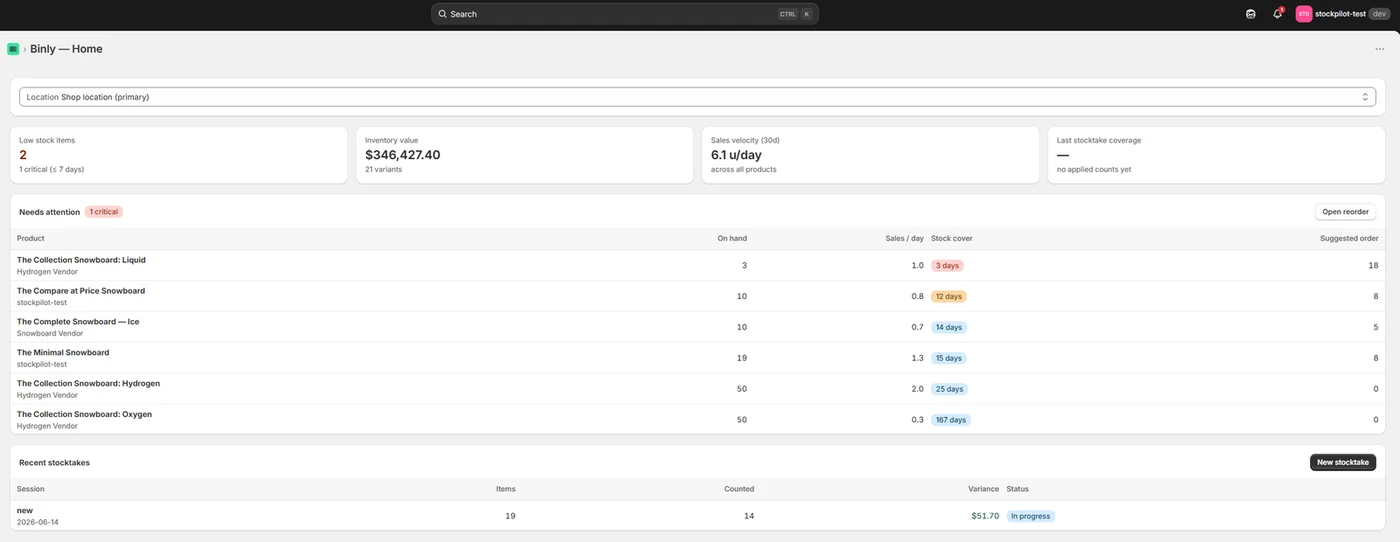
Money
Know what the stockroom is worth today
Inventory value, sales velocity and the items about to run dry, on one screen you can open before a supplier call.
- Landed cost and weighted average cost, built from the deliveries you receive in Binly.
- A month end cost of goods export your bookkeeper can read.
- Low stock alerts by email and Slack, on the free plan too.
Your ordered costs arrive with the orders, so the cost picture is not blank on day one.
The import
What comes over, and what does not
A plain answer rather than a features page. If something you relied on is missing from these lists, ask us and we will tell you straight.
Comes over
- Purchase orders, with every line, quantity and the cost you ordered at.
- Received and partly received status, the way Stocky had it.
- Reorder points, if your export still has Min and Max columns.
- Supplier names from those orders, set up as vendors you can reorder from.
- Every line matched to your Shopify products by hand, not by a fuzzy guess.
Does not come over
- Per delivery arrival dates and per delivery costs. Stocky's CSV never carried them. Binly records both on every delivery from the day you start.
- Supplier notes and terms. Paste them into Binly and it turns MOQ, case sizes and payment terms into fields you can use.
- Stocky's stocktake history. Binly counts against live Shopify stock, so old counts have nothing to do.
- Demand forecasting and open to buy planning. We do not have it, and we would rather say so here.
- Surprises in your live store. Nothing changes in Shopify until you review the import and approve it.
Side by side
What Stocky did, and where each job went
Five jobs most Stocky merchants relied on.
| In Stocky | In Binly | |
|---|---|---|
| Barcode stocktakes | Scanner counts on the shop floor | Phone camera or USB scanner, live variance in units and dollars |
| Reorder suggestions | Suggestions from sales | From your sales and the median of your own supplier lead times, with an order-by date |
| Purchase orders | Built and received in Stocky | Partial receiving, per delivery costs, receiving by scan |
| Your history | Locked in an app that stopped on August 31, 2026 | POs and reorder points import from your saved Stocky CSV |
| Cost | Bundled with Shopify POS Pro at $89 a month per location | Any Shopify plan: free, then $12, $25 or $69 a month |
POS Pro
Running POS Pro locations?
Stocky shipped as a feature of Shopify POS Pro, not as a separate app.
That is why retail merchants felt the loss most. They counted stock on the floor, reordered for the shop and cut purchase orders through it. Stocky was delisted from the Shopify App Store on February 2, 2026 and stopped working, APIs included, on August 31, 2026.
Binly covers the same three jobs from Shopify admin and a phone browser. It does not depend on which POS plan you pay for, so you can keep POS Pro for checkout and payments, or move to POS Lite, without losing stocktakes, reorder suggestions or purchase orders.
Comparing before you choose? Read the best Stocky alternatives, or see what happened and when.
Pricing
Four plans, and the migration is free
Start on the free plan today. We bring your purchase orders and reorder points across in the background as soon as you send us the export, so your first stocktake in Binly already has real numbers behind it. Every paid plan adds a 7 day free trial. No card up front, ever.
7-day free trial on paid plans, no card required.
Free
Start counting today.
free forever
- Barcode stocktakes on your full catalog
- Low stock alerts by email and Slack
- No card required
Starter
Everything a single-location store needs.
or $120 a year
- Up to 500 products
- Your primary location
- Unlimited stocktakes with barcode scanning
- Purchase orders, suppliers and receiving
- Reorder suggestions from your full order history, not just the last 2,000 orders
- Supplier minimums, case sizes and cover days, recorded and applied to every quantity
- Barcode and price label printing
Pro
For larger or multi-location stores.
or $250 a year
Everything in Starter, plus
- No catalog cap, every product you have
- All your locations plus stock transfers
- Payables and landed costs: freight, duty and discounts spread across the order
- Weighted average cost at receiving
- Cost change flags when an order costs more than the last one
- Order by dates from your suppliers’ real lead times
- Late delivery alerts in the daily digest
- Inventory value report (CSV)
- Priority email support
Growth
For stores that live by their purchase orders.
or $690 a year
Everything in Pro, plus
- Supplier price lists: what changed since the last one, and where you pay above it
- Early pay savings from your own invoices, “pay by Tuesday, save $84.20”, before the deadline
- Month end COGS pack: opening, purchases, closing, cost of goods sold, for QuickBooks and Xero
- Priority support
- Done for you Stocky migration, send your export and we load it
Prices in USD, billed through Shopify. Change or cancel any time, no contracts.
FAQ
The questions we get asked
Is Stocky's API really off?
Yes. Shopify switched it off on 31 August 2026. Anything that leaned on it, receiving and reorder inside Stocky included, stopped working that day, and no setting on your side brings it back.
Can I still get my data out of Stocky?
Possibly, but it may not stay available for long. Stocky's CSV export is the way out, so pull the file now and keep it, rather than finding out later that the door shut while you were busy with something else.
How long does the import take?
Usually the same day. A big catalog with thousands of purchase orders runs longer, and once we have opened your file we give you a real date rather than a comfortable one. No guessing.
Does anything change in my Shopify store?
Not until you approve it. We build the purchase orders and suppliers alongside your current stock, you read through them at your own pace, and only then do they go live. Nothing moves behind your back.
Do I need a barcode scanner?
No. The phone in your pocket does the job. A USB or Bluetooth scanner works too, and so does typing the SKU in by hand when the barcode has worn off.
What does the migration cost?
Nothing. We do it for free, because a shop that cannot finish the move gives up halfway and goes back to the spreadsheet it was trying to leave, and that helps neither of us. Stocky's CSV export may not stay available for long, so migrate while you still can.
Was Stocky part of Shopify POS Pro, and do I need POS Pro for Binly?
Yes to the first. Stocky shipped as a feature of POS Pro, which costs $89 a month per location. No to the second. Binly runs on any Shopify plan, online or POS, from Shopify admin and a phone browser.
Stocky is already off. Your purchase orders do not have to go with it.
Install Binly, send us the export, and we bring your purchase orders, ordered costs and reorder points across for free, so your reorders do not have to start from zero. Stocky's CSV export may not stay available for long, so migrate while you still can.
Add Binly to Shopify Built for Shopify POS and retail · running POS Pro locations? Read this