Stocky has shut down.
Here's the full timeline, and your options.
Short answer. Stocky stopped working on August 31, 2026, APIs included. Nothing migrated on its own. If you saved a CSV export, Binly imports your purchase orders and reorder points from it and recreates suppliers from the names on those orders, and you check the result before anything touches your store. If you never exported, what lived only in Stocky is gone. Your products and stock levels still sit in Shopify. Need a replacement now? See the Stocky alternative or compare the best Stocky alternatives. Last updated October 21, 2026.
Shopify has retired Stocky, its built-in inventory and purchase order app. Here's exactly what happened and when, what Shopify's admin does and doesn't replace, and the three realistic paths forward, including one that costs $12/month.
Stocky stopped working completely on August 31, 2026. Historical data did not migrate automatically.
What happened
Stocky was delisted from the Shopify App Store Feb 2, 2026, and shut off completely, including its APIs, on Aug 31, 2026.
What was lost (POs, reorder, suppliers)
Purchase orders, reorder suggestions, and supplier records didn't migrate automatically: none of it carried over when Stocky switched off.
Where to move (Binly)
Binly picks up stocktakes, reorder suggestions, and purchase orders from $12/month, the closest direct replacement for Stocky's everyday workflow.
At a glance
Where things stand right now
If you're a Shopify merchant who used Stocky for barcode stocktakes, reorder suggestions, or purchase orders, this timeline applies to you directly, whether you opened the app every week or just had it installed in the background. Stocky was bundled with Shopify POS Pro, so a lot of merchants who signed up for POS Pro's in-person checkout features ended up using Stocky for inventory without necessarily choosing it as a standalone tool. Either way, the shutdown date was the same, and so was the data risk: nothing carried over automatically when Stocky was switched off. The rest of this page walks through exactly what changed, what Shopify's own admin does and doesn't cover, and the three realistic paths merchants are taking instead.
The shutdown timeline
Three dates that matter
Here's exactly what Shopify did, and where things stand now.
Key features removed
Shopify pulled inventory transfers and the min/max forecasting engine out of Stocky in July 2025, the first real sign the app was being wound down, well over a year before the final cutoff.
Manual workarounds became routine fast.
Your raw Min and Max values stayed put, though. If your export still has those columns, Binly still turns them into reorder points today.
Delisted from the App Store
Stocky was pulled from the Shopify App Store. New merchants can no longer install it, though existing users kept access until the shutdown. This is often the point where merchants first hear the app is going away, since it stops showing up in search or recommendations.
Stopped working entirely
Stocky's APIs shut off completely. Every workflow that depended on it, from stocktakes to reorder to purchase orders, stopped functioning, and the data became inaccessible. There was no grace period after this date.
What actually goes away
What was lost when Stocky shut off
Some of this happened quietly in July 2025. The rest landed all at once on August 31. Here's the breakdown, in plain terms.
Your historical records
Every purchase order, stocktake, and supplier record stored in Stocky disappeared with the app. None of it migrated automatically; it had to be exported before August 31, 2026, or it's gone for good.
Reorder & demand planning
Stocky's sales-based reorder suggestions and restock-to-target calculations ended with it. Shopify's admin doesn't include an equivalent tool, so if you used Stocky to decide what to reorder and when, that decision-making layer disappeared entirely.
Barcode stocktake sessions
The workflow of scanning products to count inventory and reconcile against Shopify went with Stocky. Admin has no built-in barcode counting tool, so physical counts revert to spreadsheets or hand tallies unless you bring in a replacement.
The official migration path
What Shopify admin covers, and what it doesn't
Shopify's own migration guide points merchants to the built-in inventory tools in admin. It's a reasonable starting point, but it isn't a like-for-like replacement, here's exactly how far it actually gets you before you hit a gap.
| Shopify admin handles | Shopify admin doesn't cover |
|---|---|
| Inventory adjustments | Restock-to-target suggestions |
| Stock transfers between locations | Velocity-based reorder quantities |
| Basic purchase orders | Barcode stocktake sessions |
| Manual quantity edits | Historical Stocky data (nothing migrates automatically) |
Your 3 options
What to do instead
Realistically, most merchants land on one of three paths, depending on how many locations they run and how much they actually used Stocky's reorder and stocktake tools.
See it in Binly
A real look at the Binly dashboard
Not a mock-up, the actual dashboard merchants use for stocktakes, reorder suggestions and purchase orders inside Shopify.
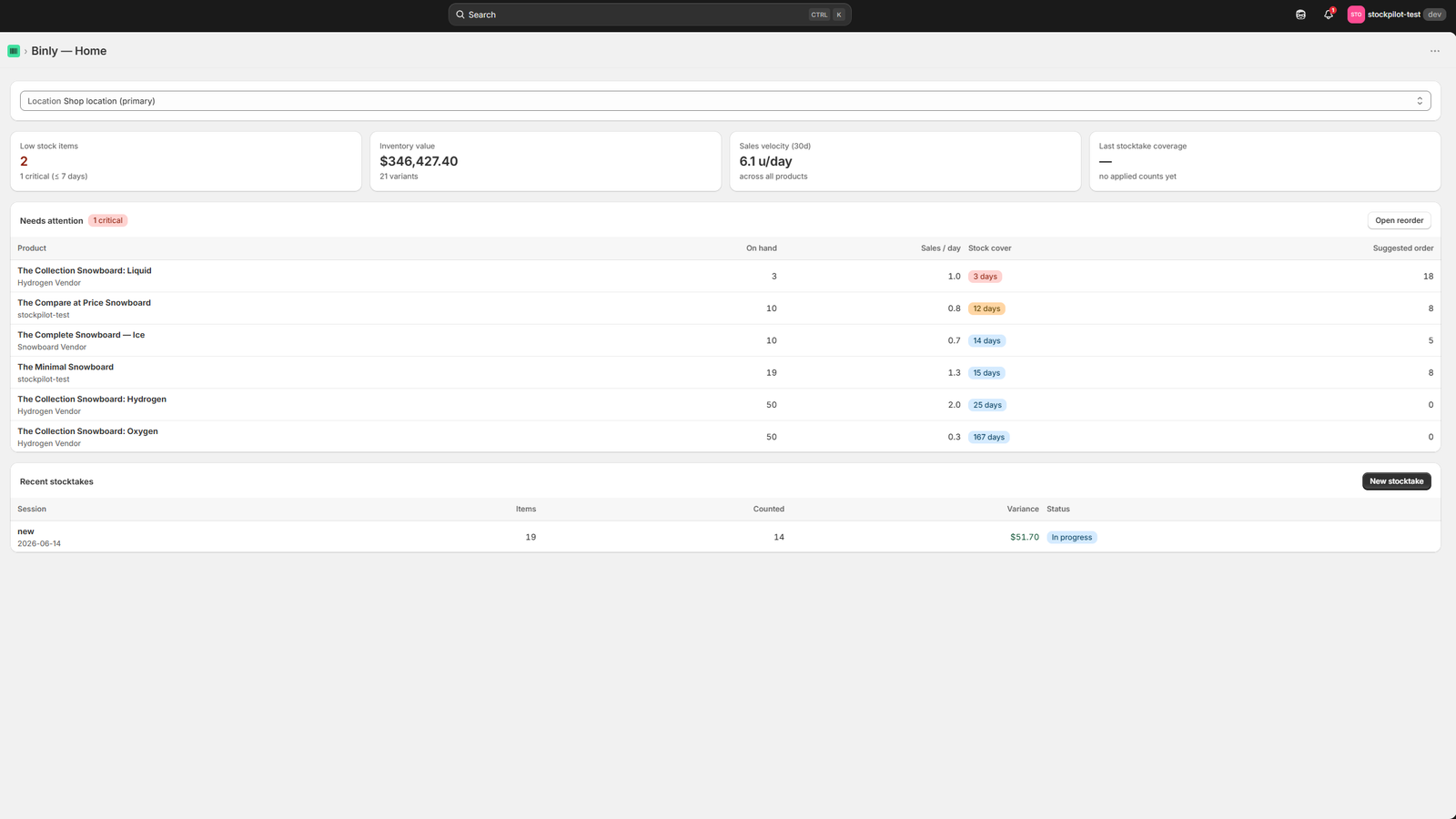
Click to enlarge
The Binly dashboard, stocktakes, reorder suggestions and purchase orders in one place.
Compare
The three options at a glance
Admin, an enterprise platform, or a lighter tool.
| Shopify admin | Enterprise platform | Binly | |
|---|---|---|---|
| Price | Free with every Shopify plan | $100 to $350+ a month | Free plan, paid from $12 a month |
| Setup | Nothing to install | Longer setup and onboarding | Open it from Shopify admin and count |
| Your Stocky history | Nothing migrates automatically | Ask the vendor | POs and reorder points import from your saved CSV |
| Best for | A handful of SKUs and no reorder planning | Multichannel or multi-warehouse businesses | Stocktakes, reorder and purchase orders for one store or a few locations |
After the shutdown
Your post-shutdown checklist
Four steps, done calmly now, get you back on solid ground.
- Find any CSV exports of your purchase orders and stocktake reports that you saved before the shutdown, and keep them safe. See the exact steps →
- Rebuild your supplier details by hand: contacts, lead times, MOQs. Stocky never let you export supplier records. Binly recreates supplier names from the purchase orders you import. You add the rest.
- Pick a replacement for what you'll actually keep using, admin, an enterprise platform, or Binly. Match the tool to how you actually used Stocky, not to every feature it offered.
- Run your replacement alongside your spreadsheets or admin counts for a couple of weeks, so nothing falls through the cracks and you can compare counts side by side.
FAQ
Common questions
When exactly did Stocky shut down?
Stocky stopped working entirely on August 31, 2026, APIs included. Shopify delisted it from the App Store on February 2, 2026, and had already pulled inventory transfers and the min/max forecasting engine in July 2025, long before the final cutoff. If your export still has Min and Max columns from before that change, Binly turns them into reorder points.
Did I lose my data when Stocky shut down?
Yes, unless you exported it first. Nothing migrated on its own, and after August 31, 2026 you could no longer reach it. CSVs of purchase orders and inventory reports that you saved still import. Dig those files out first. Supplier records never had an export.
What does Shopify's admin replace from Stocky?
It covers inventory adjustments, stock transfers between locations and simple purchase orders. It has no restock-to-target suggestions, no velocity-based reorder quantities and no barcode stocktake sessions. Those are the reorder and counting jobs most merchants used Stocky for.
Do I have to switch to an enterprise inventory platform?
No. Enterprise systems run $100 to $350+ a month, with a longer setup, and they are built for multi-warehouse, multichannel operations. Used Stocky for everyday stocktakes, reorder and purchase orders? A lighter tool usually fits better.
Can I import my Stocky purchase orders somewhere else?
Yes. If you have a CSV export of your POs, import that file into your chosen replacement. Binly matches each line to your Shopify products and creates draft purchase orders for you to review. Nothing gets re-keyed by hand.
What about my supplier records?
Stocky never let you export supplier records, ordering rules or demand-planning settings, and no tool can work around that. Binly recreates supplier names from the orders you import. You add contacts, lead times and MOQs by hand.
Is Binly a like-for-like Stocky replacement?
For the everyday essentials, yes: barcode stocktakes from your phone camera, live variance in units and dollars, reorder suggestions from sales, purchase orders with CSV import of your Stocky POs, low stock alerts and barcode label printing. It runs on any Shopify plan from $12 a month. Stocky needed POS Pro, at $89 a month per location. See how the import works.
The bottom line
Don't put this off any longer
Stocky's shutdown isn't a surprise anymore: the timeline was public since July 2025, and the App Store delisting in February 2026 made it official. What's left is a straightforward, if slightly tedious, checklist: gather the exports you saved, rebuild what you can't recover, and pick a replacement that matches how you actually used Stocky day to day. For most small and mid-sized retailers, that means Shopify's built-in admin for the basics, an enterprise platform if you've genuinely outgrown a simple tool, or something like Binly if you want the closest match to what Stocky did (stocktakes, reorder, and purchase orders) without paying for Shopify POS Pro just to get it. Whichever way you go, the work is easier done calmly now than in the middle of a busy week.
Stocky is gone, but your inventory doesn't have to stall.
Pick your replacement and get set up calmly, not in a scramble.
Start free 7-day trialNeed the export steps first? Read the export guide →