Never let your best-selling product quietly sell out
Shopify won't tell you a product is about to run out, only after it's gone. Binly alerts you by email and Slack or Discord the moment stock crosses a threshold you set, with the product thumbnail right in the alert, so you can reorder before the sale is lost.
Included on every Binly plan, including Free. No credit card required to start a trial.
Email + Slack/Discord alerts
The moment a product crosses its threshold, Binly emails your account and, if you've connected a webhook, posts the same alert to Slack or Discord.
Per-product thresholds
Use one store-wide default, or set a custom threshold on individual products so bestsellers get a bigger buffer than slow movers.
Product thumbnail in every alert
Every alert and every low-stock list shows the product photo next to the name and SKU, so you know what's running low at a glance.
See it in action
Every low-stock item, in one dashboard
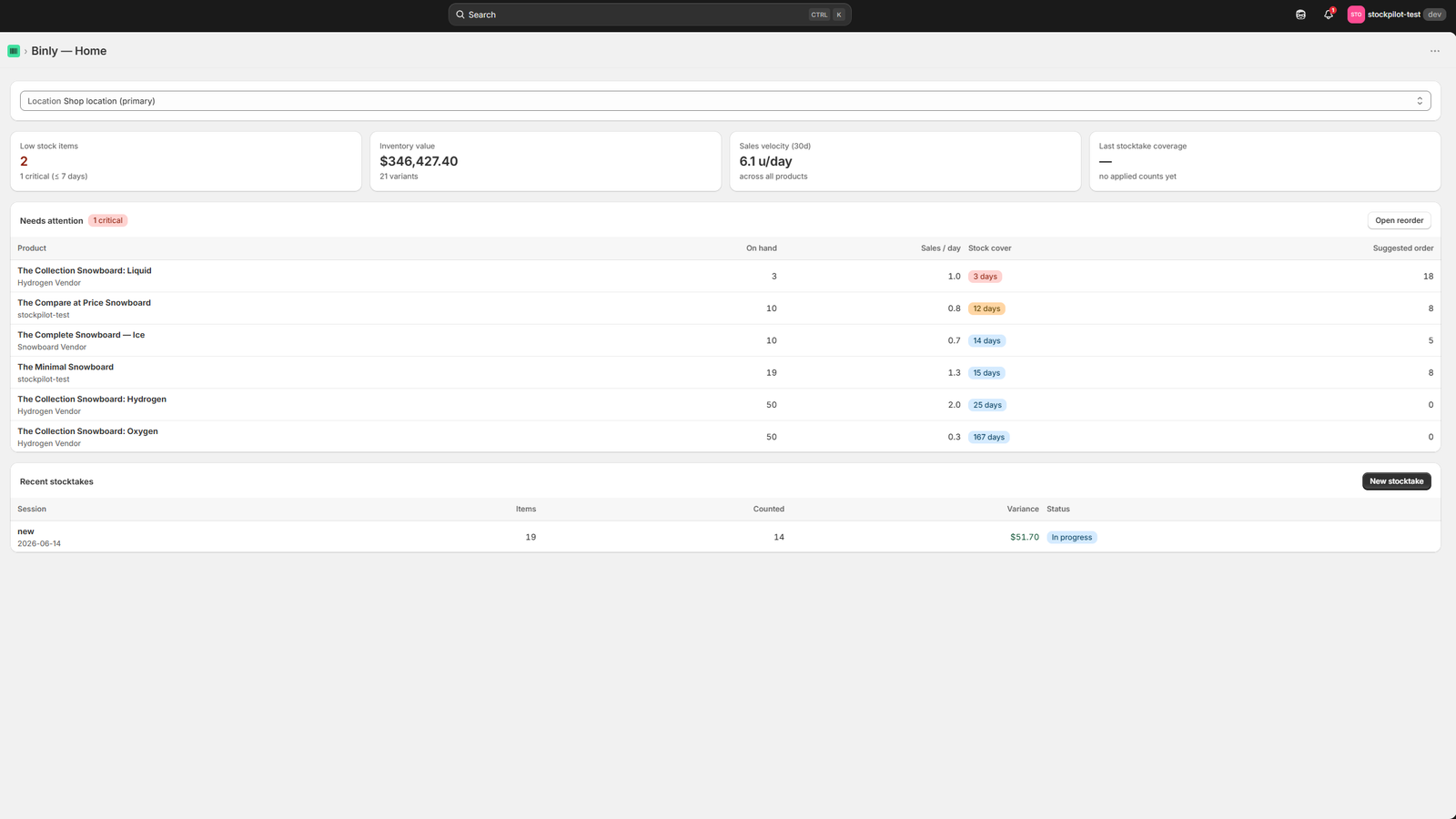
Stock levels and low-stock items at a glance, the same view every alert links back to.
Click to enlarge
The Binly dashboard: stock levels and low-stock items at a glance.
The problem
Silent stockouts cost more than the sale
By the time a product shows as sold out on your storefront, you've likely already lost sales, and you're probably still paying to send traffic to a page that can't convert.
Shopify Admin will show you a stock quantity if you go looking for it, on the Products or Inventory page. What it won't do is tell you when that number is getting low. There's no built-in way to get a notification (by email, Slack, or anything else) before a product actually runs out.
What Shopify shows you
- A quantity number on the Products and Inventory pages, if you open them and look
- A "Sold out" tag on your storefront, once stock actually reaches zero
- No push notification, badge, or alert before that point, checking is on you
What that costs you
- Sales lost to customers who land on a sold-out product and don't come back
- Ad spend still pointed at a listing that can't convert while it's out of stock
- A scramble to reorder after the fact, instead of a heads-up while there was still time
How it works
How Binly alerts you
Three parts: a threshold you control, a notification that reaches you where you already work, and enough context in the alert to act on it right away.
Set a threshold, per product or store-wide
Pick a default low-stock number that applies across your catalog, or set a custom threshold on individual products, a fast-moving bestseller and a slow accessory don't need the same buffer.
Get notified by email and Slack or Discord
The moment a variant's available quantity drops to or below its threshold, Binly emails your account, and, if you've connected a webhook, posts the same alert to a Slack or Discord channel so the whole team sees it.
See the product, not just a SKU
Every alert and every low-stock list in Binly shows the product thumbnail next to the name and SKU. When more than one item is running low at once, you know what you're looking at without clicking through first.
Setup
Set up in three steps
Install Binly
Add Binly from the Shopify App Store, it reads your product and inventory data automatically, no CSV import required to get started.
Set your threshold
Use one store-wide default, like 5 units, or open a product and set a custom threshold for the ones that need it.
Connect email and Slack/Discord
Alerts go to your account email automatically. Add a Slack or Discord webhook URL in settings to also post alerts to a channel.
From alert to restock
An alert that leads somewhere
A notification on its own doesn't restock anything. Every low-stock alert in Binly links back to that product, where reorder suggestions and purchase orders already live.
When a threshold trips, the alert takes you to that product in Binly, showing current stock, recent sales velocity, and a suggested reorder quantity. From there, adding it to a purchase order, new or existing, takes a couple of clicks, not a separate spreadsheet open in another tab.
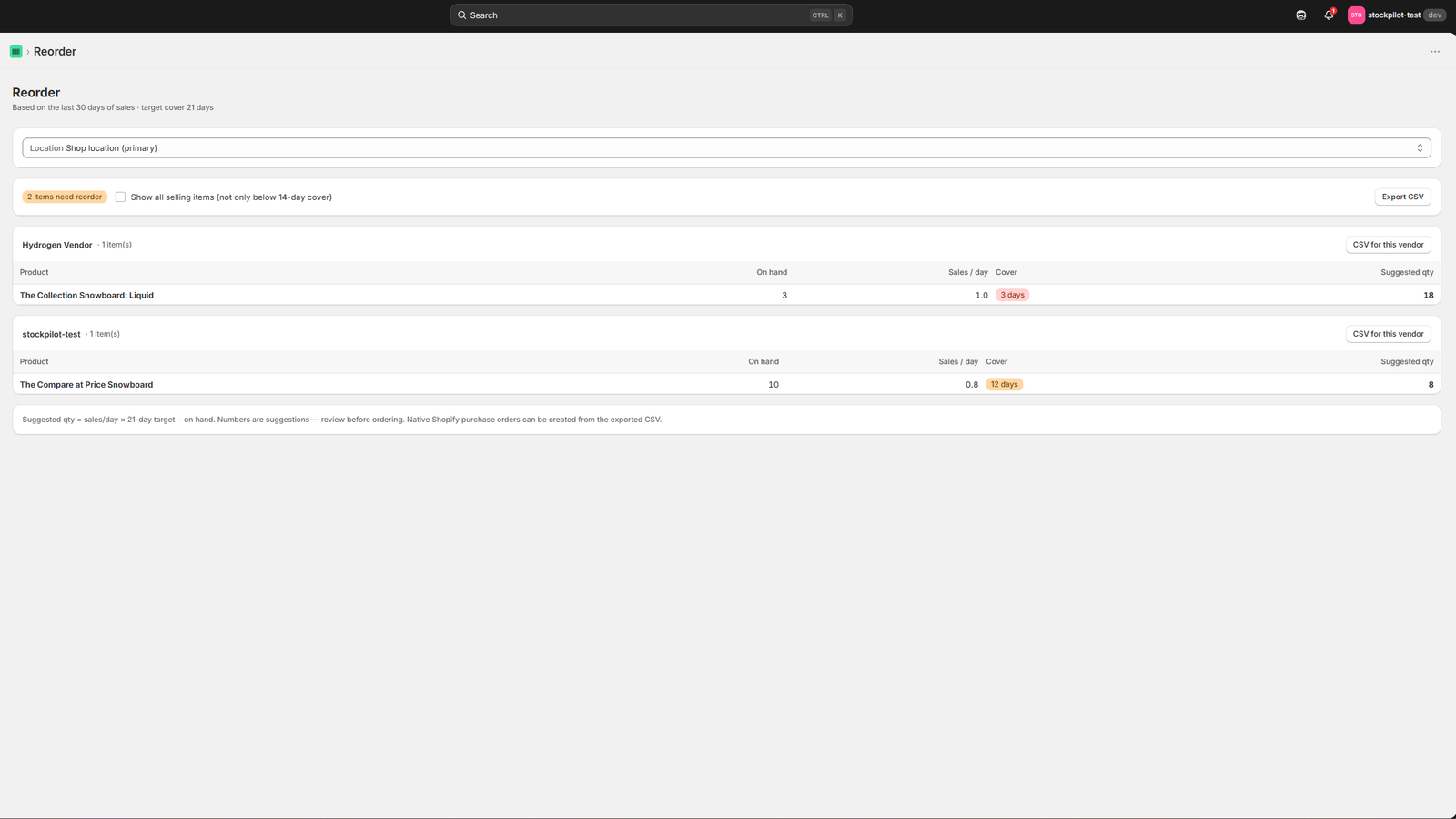
The same reorder screen a low-stock alert links to, quantities are based on how the product has actually been selling.
Coming from Stocky
If you're used to Stocky's reorder points
Stocky's low-stock flags were tied to reorder points set on each product. Binly's threshold alerts cover the same job, a heads-up before you run out, and add email plus Slack/Discord delivery on top.
Stocky itself stopped working on August 31, 2026, so any low-stock alerting you were relying on there needs a new home now, whichever replacement you choose.
Pricing
Low stock alerts, on every plan
Alerting isn't locked behind a paid tier, it starts on Free.
FAQ
Common questions
Does Shopify have low stock alerts?
Not as a built-in notification. Shopify Admin will show a stock quantity on the Products and Inventory pages if you go look, and a "Sold out" tag once a product hits zero, but there's no native email, Slack, or push alert before that happens. You have to check manually, or use an app like Binly to get notified.
Can I get low stock alerts in Slack?
Yes. Add a Slack or Discord webhook URL in Binly's settings and low-stock alerts post to that channel automatically, in addition to the email alert that's sent by default.
Can I set different thresholds per product?
Yes. Set one store-wide default threshold that applies across your catalog, or override it on individual products, useful when a fast seller needs a bigger buffer than a slow one.
Does the alert show a photo of the product?
Yes. Every low-stock alert and every list in Binly shows the product thumbnail alongside the name and SKU, so you know what's running low without clicking through first.
Is low stock alerting available on the free plan?
Yes. Binly's Free plan includes low-stock alerts and basic stocktakes. Upgrading to Starter, from $12/mo, adds Slack and Discord alert delivery alongside purchase orders, reorder suggestions, and barcode receiving.
Never find out from a customer that you're sold out.
Set your first low-stock threshold in Binly in a couple of minutes.
Start free 7-day trialNo credit card required