Give every supplier a record, lead time, contact, and every purchase order tied to it
Shopify gives you a one-line "Vendor" field on a product, no contact, no lead time, no history of what you've ordered from them. Binly adds a real supplier record, groups your products by vendor, and turns reorder suggestions into a purchase order for the right supplier in one click.
Suppliers and purchase orders are part of Starter, from $12/mo, not on the Free plan. No credit card required to start a trial.
Real supplier records
Store a contact person, email, phone, lead time in days, and notes for every supplier, not just a vendor name typed onto a product.
Products grouped by vendor
Reorder suggestions and bulk purchase-order creation are grouped by the vendor already set on your Shopify products, so you see what each supplier needs at a glance.
One click, one PO per supplier
"Create all purchase orders" turns reorder suggestions into a separate draft PO for each supplier, pre-filled with their saved contact for emailing.
See it in action
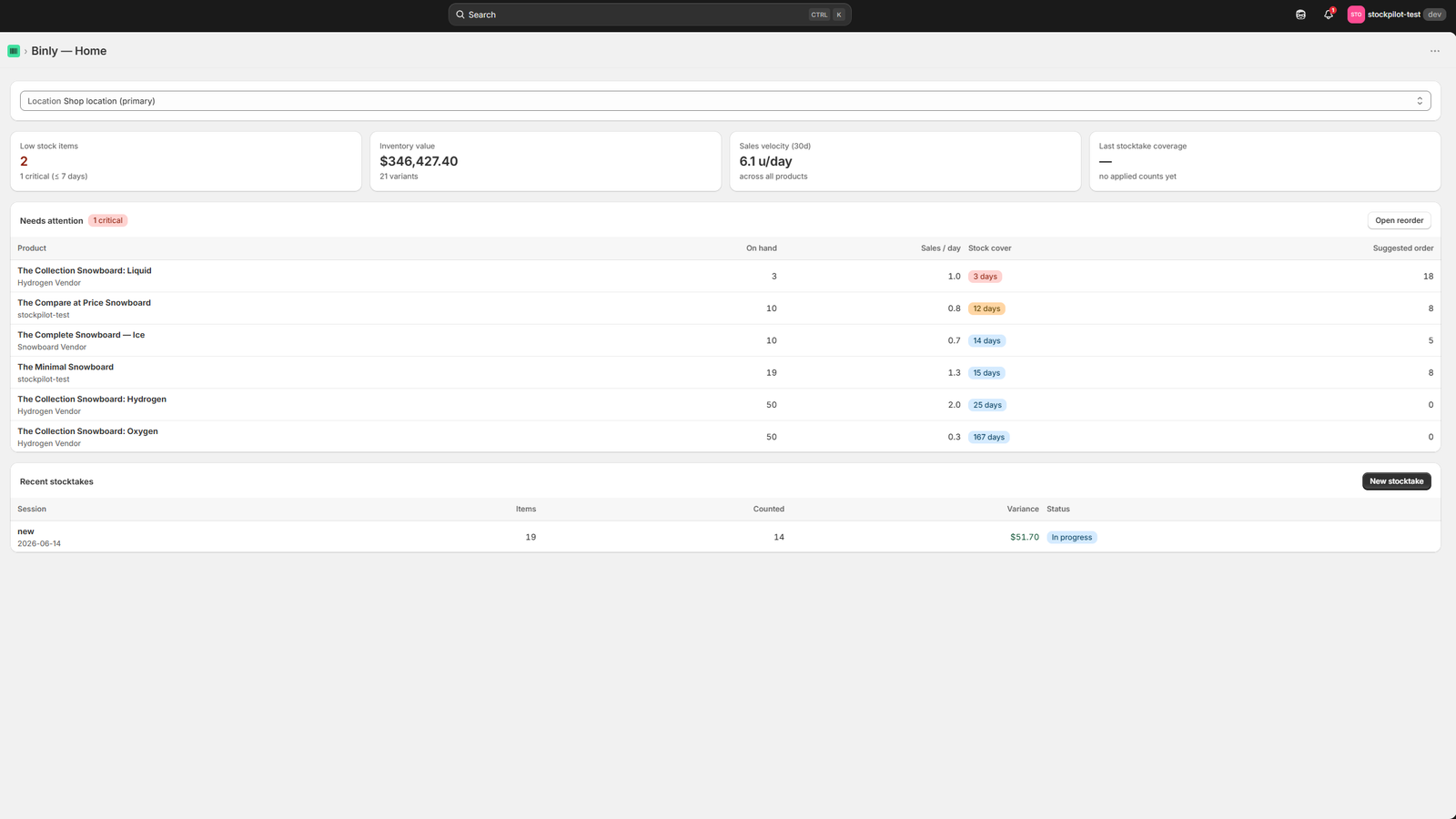
The same dashboard your suppliers, POs, and reorder suggestions run from
Stock levels and low-stock items at a glance, the same view your suppliers and purchase orders connect back to.
Click to enlarge
The Binly dashboard: stock levels and low-stock items at a glance.
The problem
Shopify doesn't have a supplier record, just a text field
Open any product in Shopify Admin and you'll find a "Vendor" field. Type a name into it, and that's the entirety of Shopify's built-in supplier management.
There's no page listing your suppliers, no place to save a contact email or phone number, no lead-time setting, and no view of what you've ordered from a given vendor or how much you currently have open with them. If you want any of that, it lives in a separate spreadsheet or your own memory, disconnected from the product data and purchase orders it actually needs to inform.
What Shopify gives you
- A single "Vendor" text field on each product, editable per item
- No contact info, lead time, or notes attached to that name
- No purchase order history grouped by vendor inside Shopify Admin
What that costs you
- Lead times tracked in your head or a separate sheet, disconnected from reorder timing
- Purchase orders sent from your own inbox, with no record tying them to a supplier
- No easy answer to "how much do we currently have on order with this vendor?"
How it works
How supplier management works in Binly
Three parts: a supplier record with the details Shopify doesn't track, products grouped by the vendor you already assign them, and purchase orders that know which supplier they're going to.
Create a supplier record
Add a name, contact person, email, phone, lead time in days, and any notes, one record per supplier, kept separately from any single product.
See products grouped by vendor
Binly groups your reorder suggestions by the vendor already set on each Shopify product, so you see everything you'd need to order from one supplier together, not scattered across your whole catalog.
Turn suggestions into a PO per supplier
Assign a supplier to a purchase order, or let "Create all purchase orders" do it automatically, and the reorder point for that product factors in the lead time you set for the supplier.
Setup
Set up in three steps
Add your suppliers
Enter each supplier's name, contact person, email or phone, and lead time in days. A couple of minutes per vendor.
Group reorder suggestions by vendor
Binly's reorder page groups suggested restock quantities by the vendor already on your products, using each supplier's lead time to calculate the reorder point.
Create a PO per supplier
Use "Create all purchase orders" to generate one draft PO per supplier from your reorder suggestions, or build one manually and assign a supplier yourself.
From suggestion to PO
A supplier record that leads somewhere
A contact list on its own doesn't restock anything. Every supplier in Binly is attached to the purchase orders and reorder suggestions that already reference it.
Assign a supplier to a purchase order and "Email to vendor" pre-fills that supplier's saved email address, no retyping it from memory. Receive the delivery later, in full or partially, and the received quantity is written back to Shopify against that same purchase order, reconciled against what was actually ordered.
Coming from Stocky
If Stocky held your supplier list
Stocky let you attach a supplier to a product and to purchase orders. Binly's supplier records cover the same job (contact, lead time, and a link to your POs) with reorder suggestions and bulk PO creation grouped by vendor on top.
Stocky itself stopped working on August 31, 2026, and nothing carried over automatically, including whatever supplier records you kept there.
Pricing
Supplier management is part of Starter
Suppliers, purchase orders, and reorder suggestions aren't on the Free plan.
FAQ
Common questions
Does Shopify have supplier or vendor management?
Not really. Shopify products have a single-line "Vendor" text field, but there's no supplier record behind it, no contact info, no lead time, no cost, and no view of purchase history tied to that name. An app like Binly is needed to add any of that.
Can I attach a lead time to a supplier?
Yes. Every supplier record includes a lead time in days, and Binly's reorder point calculation for products tied to that supplier factors it in, so the suggestion accounts for how long a reorder actually takes to arrive.
Does a purchase order have to be tied to a supplier?
Assigning a supplier is optional on any single PO, but doing so lets "Email to vendor" pre-fill their saved address, and it's how "Create all purchase orders" groups reorder suggestions by vendor into separate draft POs automatically.
Can I import supplier data from Stocky?
No, Shopify doesn't export supplier records from Stocky at all, which is a Shopify limitation rather than something any replacement app can work around. Re-enter your suppliers in Binly now: Stocky shut down on August 31, 2026.
Is supplier management available on the free plan?
No. Supplier records, purchase orders, and reorder suggestions are part of Starter, from $12/mo. Binly's Free plan covers stocktakes and low-stock alerts.
Stop keeping supplier lead times in your head.
Add your first supplier record in Binly in a couple of minutes.
Start free 7-day trialNo credit card required