Purchase orders for Shopify that don't need a spreadsheet on the side
Stocky, Shopify's built-in purchase order tool, stopped working on August 31, 2026. Shopify's own admin has basic purchase orders built in, but basic is the operative word. Binly connects your POs to what's actually selling, so reorder quantities stop being a guess.
Stocky was delisted from the App Store Feb 2, 2026 and stopped working entirely on Aug 31, 2026.
POs from reorder suggestions
Start a purchase order straight from a reorder suggestion based on sales velocity, instead of building the quantities from scratch.
Grouped by supplier
Line items land on the right supplier's PO automatically, so reordering from one vendor stays a single order instead of several.
Receive stock & update Shopify
Scan items in as they arrive and received quantities post straight to your Shopify inventory, no separate stock adjustment step.
See it in action
Every purchase order, in one dashboard
Stock levels and open purchase orders at a glance, the same view Binly's reorder suggestions and alerts link back to.
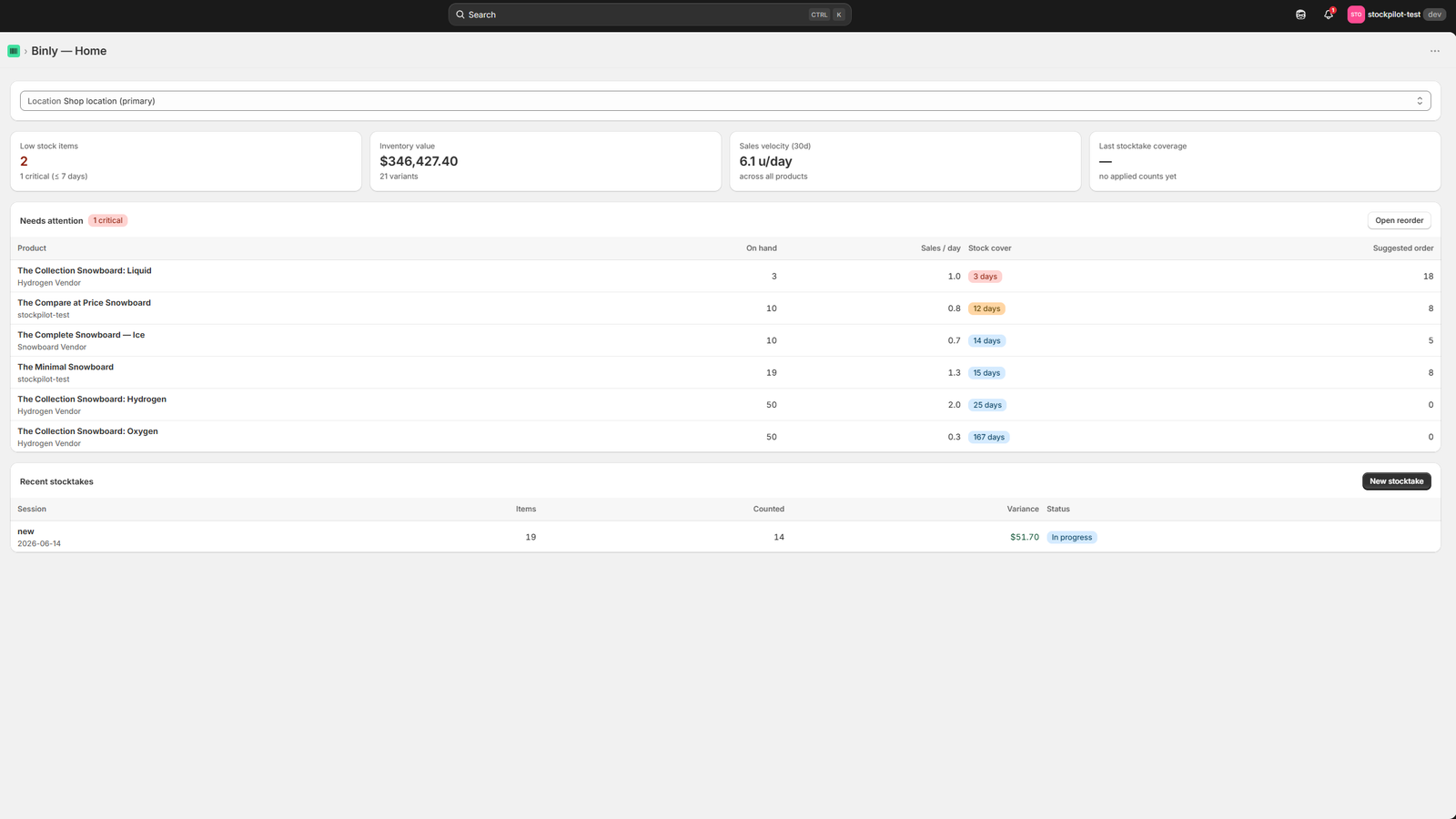
Click to enlarge
The Binly dashboard: stock levels and purchase orders at a glance.
Native vs. purpose-built
What Shopify's built-in POs do, and where they stop
Shopify Admin ships with basic purchase orders. Here's exactly what that covers, and what it leaves for you to solve another way.
Native purchase orders live in Shopify Admin, and Shopify added them specifically to give merchants somewhere to land after Stocky's retirement. They work, and they're free, but the feature set stops at creating and receiving an order.
What Shopify Admin covers
- Create a purchase order from your products screen, picking a supplier and adding line items one at a time
- Receive a PO against it, partially or in full, and mark the remainder as backordered
- Stock levels update automatically once a PO is received, so your products screen reflects the new count right away
Where it stops
- No reorder quantity suggestions based on sales velocity, you're estimating by hand from a sales report in another tab
- No low-stock alerts tied to supplier lead times, so a slow vendor can leave you short without warning
- No barcode receiving with your phone, line items get checked off manually, one at a time, from a list
- No stocktake workflow to reconcile what a PO said arrived against what's actually counted on the shelf
What merchants keep asking for
The same handful of requests, over and over
These aren't hypothetical, they're the receiving-mechanics complaints that come up again and again in Shopify merchant communities. Each one is a problem a purpose-built tool already solves.
Scan it straight onto the PO
Instead of typing a SKU or scrolling a product list, scanning a barcode should add the line item directly, whether you're building the PO or receiving it against a delivery that just came off the truck.
See on-hand stock while building the PO
Knowing what's already sitting on the shelf, right next to the reorder field, means quantities get chosen with information instead of a guess pulled from memory or a spreadsheet.
Costs that stick after receiving
A cost entered on a purchase order should stay attached to that inventory, not disappear the moment the PO is marked received, so margin numbers later on are still accurate.
Receive hundreds of SKUs without leaving the screen
A weekly delivery with 200+ line items needs a receiving flow built for volume, not one field typed at a time while a driver waits at the counter.
Side by side
Shopify admin purchase orders vs Binly
Admin handles the basics well, and it is free. This is where the two differ.
| Shopify admin | Binly | |
|---|---|---|
| Price | Free with Shopify | From $12/mo, free plan for counts and alerts |
| Create a PO and pick a supplier | Yes | Yes, or start from a reorder suggestion |
| Receive partly or in full | Yes | Yes, by scanning with your phone |
| Reorder quantities from sales velocity | No | Yes, Starter |
| Barcode receiving with a phone | No | Yes, Starter |
| Order-by dates from real supplier lead times | No | Yes, Pro |
| Stocktake to check what arrived against the shelf | No | Yes, free plan |
| Import POs from a Stocky CSV | No | Yes |
Deliveries
When a delivery arrives in pieces
A clean, complete delivery is the easy case. Test the messy one.
- Partial deliveries: receive what arrived, keep the rest open. The missing item is not on your shelf, so it should not be in Shopify either.
- Cost per delivery: each delivery carries its own cost. That matters when one order reaches you in separate shipments over a few weeks.
- Cost changes: Pro flags an order that costs more than the last one. Growth adds supplier price lists and shows where you pay above them.
- Late deliveries: Pro puts late delivery alerts in the daily digest.
How it works
How POs work in Binly
Four steps, from creating the order to stock landing back in Shopify.
Create a PO, or import your Stocky ones
Build a purchase order line by line, or upload a CSV exported from Stocky and Binly matches each line to your Shopify products by SKU or barcode automatically.
See reorder suggestions from sales velocity
Binly reads how fast each product has actually been selling and suggests order quantities, so the numbers reflect what's actually moving off the shelf.
Receive by scanning with your phone camera
Open the PO on your phone and scan barcodes as items come off the truck, no separate scanner hardware to buy, and nothing to install on iPhone or Android.
Stock updates in Shopify on receipt
Received quantities post straight to your Shopify inventory, and the cost you entered on the PO stays attached to the item for future margin reporting.
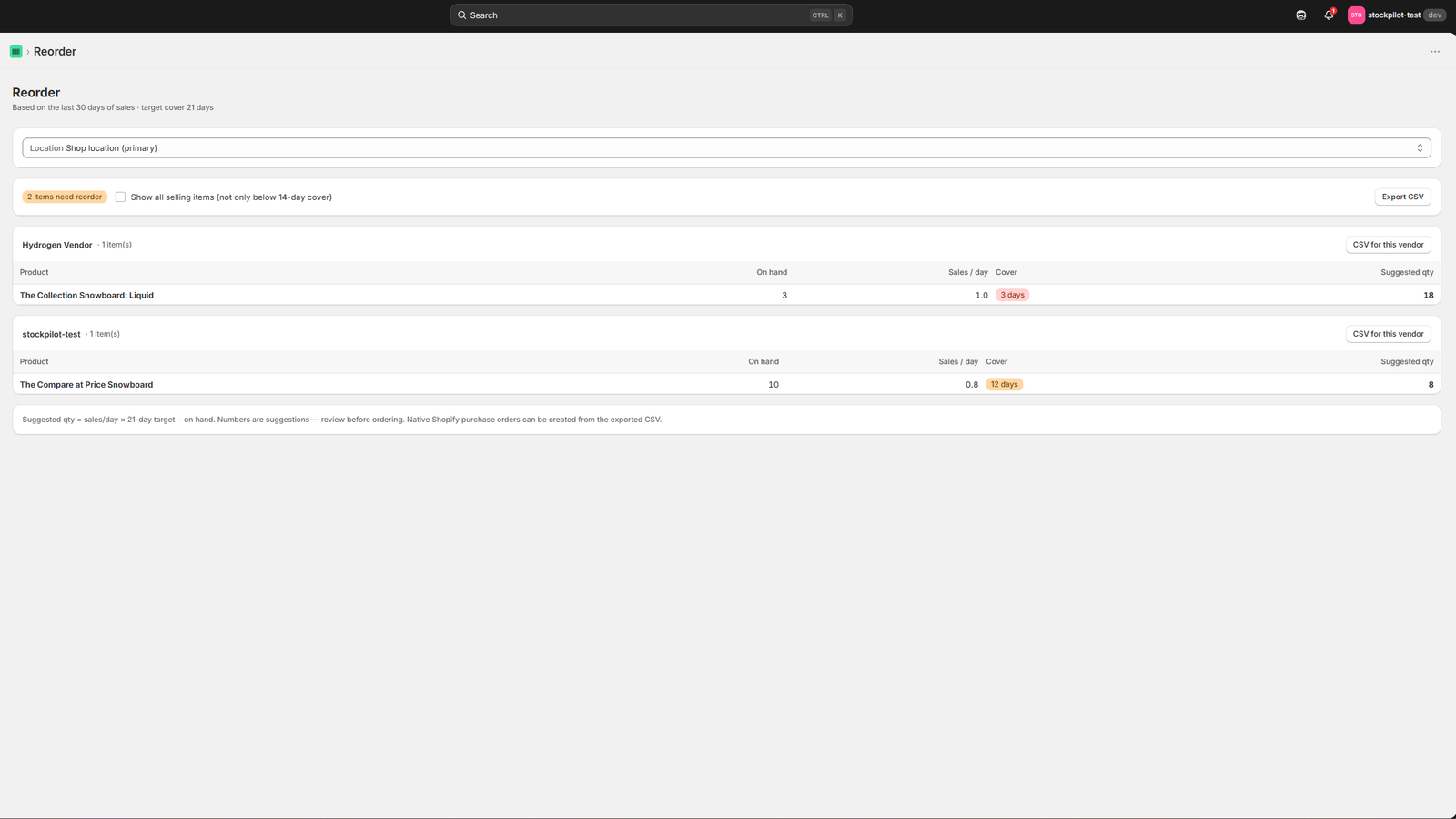
The same reorder screen shown above, quantities update as sales come in, so the list stays current without a manual recalculation.
Being upfront
What Binly's POs don't do
Binly's purchase orders are built for receiving mechanics (creating an order, tracking what's been sent, and reconciling what comes back) not for merchandising decisions like pricing or margin planning. To be upfront about the edges:
- No retail-price editing inside the PO
- No automatic margin-% calculations
- No per-channel (POS vs. online) sales columns
If any of those are your core need (say, you're managing markdowns or channel-specific pricing as part of receiving) a merchandising-focused tool is going to fit better than Binly will.
Migration
Coming from Stocky?
Stocky stopped working entirely on August 31, 2026. Here's how to bring your purchase order history into Binly from a CSV export.
Find your PO export
Find the CSV you exported from Stocky (Purchase Orders → Export All). Stocky's API is off, so that file is what Binly imports. Anything that was never exported can't be brought across.
Import the CSV into Binly
Upload the export in Binly and it matches each line to your Shopify products by SKU or barcode, so your PO history doesn't have to be re-keyed by hand, line by line.
Fill in supplier details
Binly recreates suppliers from the names on the orders you import. Stocky cannot export contacts, lead times or terms, so those you add by hand, or paste your supplier notes and Binly turns MOQs, case sizes and payment terms into fields. See supplier and vendor management in Binly for how they are recorded.
None of this needs a long project. The import takes a few minutes, and once it is done your purchase history and reorder suggestions live in one place.
Pricing
Purchase orders included, not upsold
One plan for most stores, a free tier for the basics, and no surprise about what POs cost extra.
Purchase orders aren't a paid add-on bolted onto a cheaper base plan, they're included in Starter, the same plan that covers reorder suggestions and barcode receiving.
Starter
billed monthly · purchase orders included
- Purchase orders & receiving
- Reorder suggestions from sales velocity
- Barcode receiving via phone camera
- Low stock alerts (email, Slack, Discord)
7-day free trial, no credit card required
FAQ
Common questions
Does Shopify have built-in purchase orders?
Yes, Shopify admin includes basic purchase orders. You create a PO, receive it, and stock updates on its own. What it lacks: reorder suggestions from sales velocity, low-stock alerts tied to supplier lead times, and barcode receiving from your phone.
Can I import my Stocky purchase orders?
Yes, from a saved CSV. In Stocky that was Purchase Orders, Export All, CSV. Upload the file into Binly and it matches each line to your Shopify products by SKU or barcode, then creates draft purchase orders for you to review. Reorder points come across when the export has Min and Max columns. Suppliers are recreated from the names on those orders. Stocky's API is off. A file you never exported cannot be recovered. Read the export guide for the steps.
Do I need scanner hardware to receive?
No. The receiving screen works from your phone's camera in the browser, on iPhone or Android, with nothing to install and nothing to pair. A USB scanner works too if you already have one.
Can I receive one order in separate deliveries?
Yes. Binly purchase orders support partial deliveries and cost per delivery. Receive what arrived and leave the rest open. Each scan adds one unit, and a single tap writes the new quantities to Shopify, so the next truck starts from a clean record.
How does Binly decide when I should reorder?
It uses reorder points, low stock alerts by email and reorder suggestions built from your sales and from the real lead times of past deliveries, so a slow supplier is treated differently from a fast one. Treat a suggestion as input. You know about next month's promotion or the range you are dropping. The app does not.
What do Binly purchase orders not do?
They are built for receiving mechanics: creating an order, tracking what you sent and reconciling what came back. There is no retail-price editing inside the PO, no automatic margin percentage and no per-channel sales columns. If those are your core need, a merchandising tool fits better.
Is there a free plan?
Yes, though purchase orders sit in Starter, from $12 a month, with a 7-day free trial and no credit card to start. The free plan covers low stock alerts and stocktakes.
Purchase orders that already know what's selling.
Stocky shut down on August 31. Set up your first PO in Binly today.
Start free 7-day trialNo credit card required