How to set reorder points for your Shopify store
A reorder point is the stock level that tells you exactly when to place your next order, early enough that replacement stock arrives before you sell through what's left. Here's the standard formula, a worked example, and how to estimate the two numbers most people end up guessing at: lead time and safety stock.
7-day free trial. No credit card required.
No more stockouts
A reorder point set from real sales data means you place your next order while there's still enough stock left to cover the wait for it to arrive.
No more cash tied up
A reorder point that's too high ties up cash in stock that just sits there. Getting the number right keeps the buffer no bigger than it needs to be.
No spreadsheet required
The formula is simple, but recalculating it by hand for every product as sales change isn't. Software can do the arithmetic for you, continuously.
What a reorder point is
The reorder point formula
A reorder point isn't a guess or a round number you picked because it felt safe, it's a calculation with three inputs, each one answering a specific question about a specific product.
A reorder point is the stock level at which you should place your next purchase order, timed so the new stock lands before the old stock runs out. It's not the same as a low-stock alert threshold, though the two work well together, a reorder point tells you when to order, a low-stock alert tells you when you've crossed that line without having to check manually.
The standard formula used for this, in inventory management generally and not anything specific to Shopify, is:
Worked example from the Organic Tee below: 6 units/day × 12-day lead time + 20 units safety stock = 92.
Average daily sales
How many units of this product you actually sell on an average day. Base it on recent sales history, a trailing 30 or 60 days is usually more honest than "what it used to sell before."
Lead time in days
How long it takes from placing a purchase order with your supplier to having that stock available to sell, not just shipped, but received, checked in, and on the shelf.
Safety stock
An extra buffer on top of the math, sized to cover the ordinary unpredictability in sales pace and delivery time, not a worst-case scenario, just a reasonable cushion.
Worked example
Putting the formula to work
Here's the same calculation as the example above, walked through one input at a time.
Say you sell an Organic Tee. Looking at the last couple of months of orders, it's been selling at an average of 6 units a day. Your supplier for that tee, from the day you place the purchase order to the day it's checked into your stockroom, takes 12 days. And because sales aren't perfectly steady and your supplier's lead time can slip by a few days here and there, you decide on a safety stock of 20 units.
Plugging those three numbers into the formula:
That means: the moment your Organic Tee's stock hits 92 units, it's time to place a new purchase order. Not before, you'd be tying up cash and shelf space earlier than necessary. Not after, you'd risk running out before the new stock arrives, since 72 of those 92 units (6/day × 12 days) are there to carry you through the wait, with the remaining 20 as a cushion if sales pick up or the shipment runs a little late.
Schematic illustration of the reorder point concept, not exact sales data.
The two numbers people guess at
How to estimate lead time and safety stock
Average daily sales is easy to pull from a sales report. Lead time and safety stock are where most reorder points go wrong, because both get guessed instead of measured.
Lead time: measure it, don't estimate it
- Look at your last several purchase orders for that supplier and note the days between placing the order and the stock being ready to sell
- Use the actual received-and-checked-in date, not the shipped date, a box sitting unopened in a stockroom isn't sellable stock yet
- If lead time varies a lot between orders, lean toward the slower end rather than the average, it costs less to have stock arrive a few days early than a few days late
Safety stock: size it to the risk
- A simple starting rule of thumb: a few days' worth of average sales, sized up for products with unpredictable demand or a supplier that isn't always reliable
- Fast-moving bestsellers usually deserve a bigger safety stock than slow-moving items, running out costs you more sales on a product that was already selling well
- For more precision, some teams use: safety stock = (highest daily sales × longest lead time) − (average daily sales × average lead time), worth trying once you have enough order history to trust the inputs
Doing it without the spreadsheet
Let software compute it from your real sales data
The formula is simple for one product on one day. It gets tedious fast across a full catalog, where average daily sales shifts every week and every product has its own lead time.
This is the part of reorder points that's genuinely worth automating. Binly reads your actual order history to calculate each product's average daily sales, combines it with the supplier lead time you set for that product, adds a safety stock margin, and keeps the reorder point current as your sales pace changes, instead of a number from a spreadsheet that was accurate the week you built it and stale ever since. Once a product's stock approaches its computed reorder point, it's flagged the same way a low-stock alert would flag it, and from there it's a couple of clicks into a purchase order, not a separate spreadsheet open in another tab. For a deeper look at how the sales-velocity side of this works, see our guide to inventory forecasting.
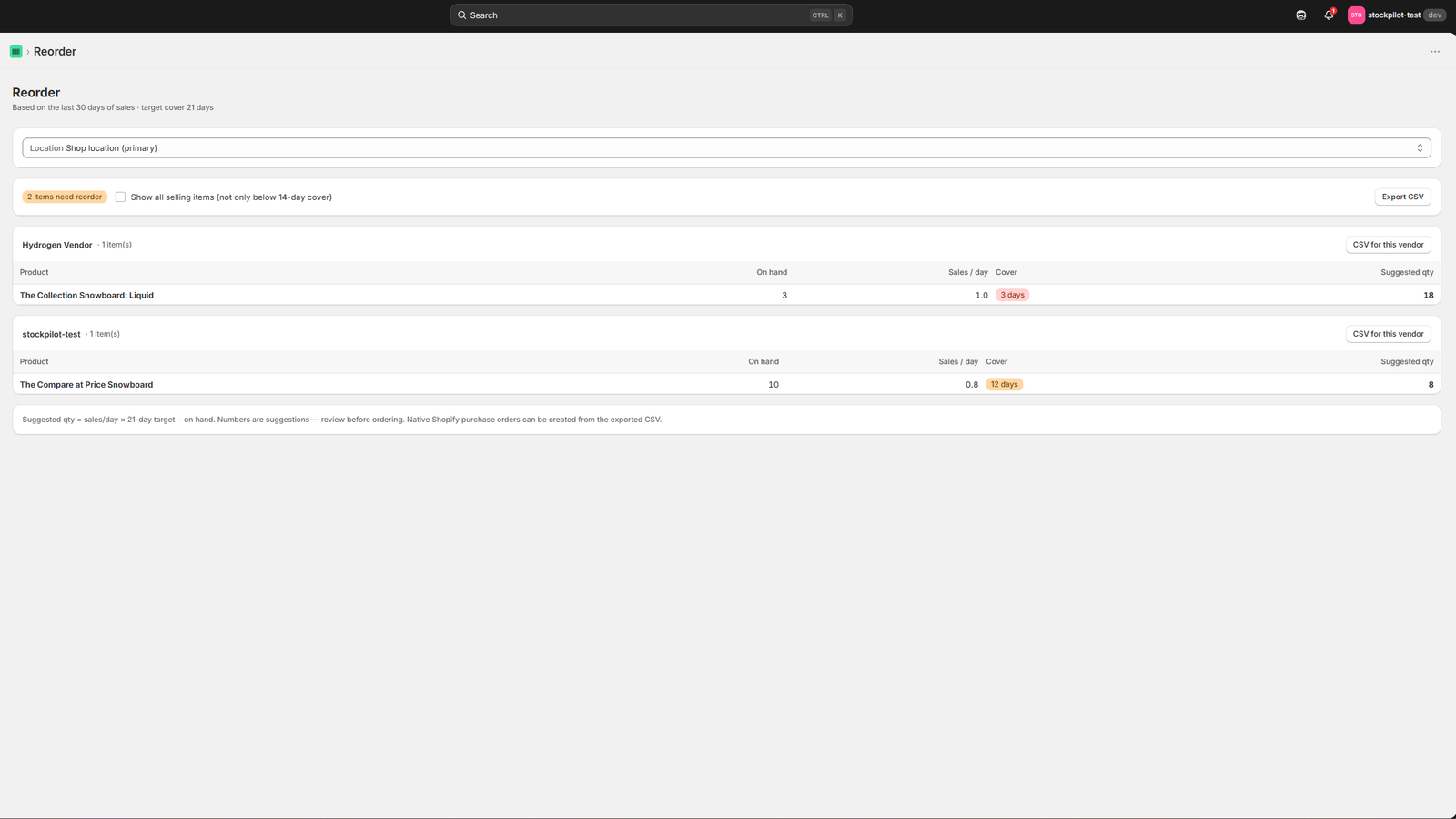
Click to enlarge
An actual screenshot of Binly's reorder screen, nothing rendered or mocked up for this page.
Coming from Stocky
If you were setting reorder points in Stocky
Stocky, Shopify's own inventory app, had a reorder-point feature built around the same idea, a threshold per product, factoring in sales pace and lead time.
FAQ
Common questions
What is the reorder point formula?
Reorder point = (average daily sales × lead time in days) + safety stock. The first part covers how many units you'll sell while waiting for a new order to arrive; safety stock adds a buffer for the ordinary ups and downs in sales pace and delivery time.
How do you calculate reorder points in Shopify?
Shopify Admin doesn't calculate reorder points on its own, you'd need to pull average daily sales from a sales report and work out lead time and safety stock yourself, then apply the formula by hand for every product. An app like Binly calculates this automatically from your actual order history instead.
What is a good safety stock number?
There's no single right number, it depends on how unpredictable a product's sales are and how reliable its supplier is. A common starting point is a few days' worth of average sales, sized up for fast-moving or unreliable-supplier products and down for slow, steady ones.
When should I reorder inventory?
The moment a product's stock reaches its reorder point, the level calculated to cover expected sales during your supplier's lead time, plus a safety stock buffer. Ordering earlier ties up cash and shelf space sooner than necessary; ordering later risks running out before the new stock arrives.
Does Shopify calculate reorder points automatically?
No, not natively. Shopify's own Stocky app used to offer this, but it has been retired. Apps like Binly fill that gap by computing a reorder point per product automatically, from real sales velocity and the supplier lead time you set.
Stop calculating reorder points by hand.
See reorder points computed from your real sales data inside Binly.
Start free 7-day trialNo credit card required