A lighter Inventory Planner alternative for Shopify
Inventory Planner by Sage is a solid, established forecasting tool (built for multichannel brands that need deep demand planning, at custom, quote-based pricing. If you're a Shopify-only or Shopify-first store that just needs the everyday jobs) stocktakes, reorder suggestions, purchase orders and barcode labels. Binly gives you a real free plan to start and transparent pricing after that.
Inventory Planner is free to install with custom, quote-based pricing beyond that (verified on its Shopify App Store listing). Binly's pricing is public: Free, then $12–$69/mo.
A free plan, not a sales call
Start with barcode stocktakes and low-stock alerts today, no credit card and no quote request. Upgrade to reorder suggestions and purchase orders only once you need them.
Stocktakes, reorder, POs & labels together
The everyday physical-inventory jobs most Shopify stores handle, in one app, not split across a forecasting subscription plus a separate counting and labeling workflow.
Built for Shopify, nothing else to sync
Installs from the Shopify App Store and reads your existing catalog directly, no separate data connector or accounting-system sync to configure before you can use it.
See it in Binly
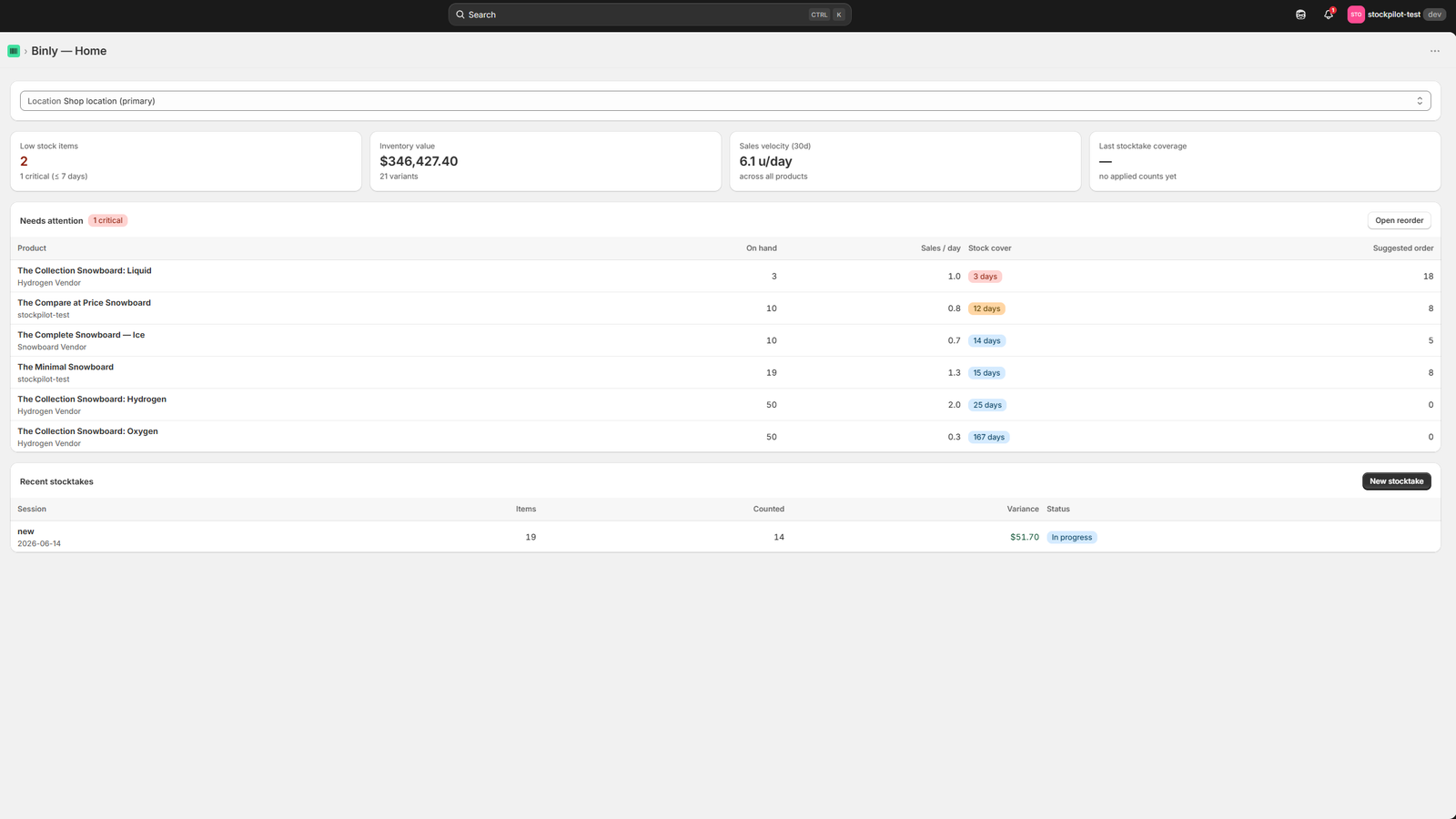
A real look at the Binly dashboard
Not a mock-up, the actual dashboard merchants use for stocktakes, reorder suggestions and purchase orders inside Shopify.
Click to enlarge
The Binly dashboard, stocktakes, reorder suggestions and purchase orders in one place.
Why compare
Where Inventory Planner and Binly actually differ
Inventory Planner by Sage is a real, established forecasting product, not a name we're inventing to look good next to. Here's what it's actually built for, and why plenty of Shopify merchants still want something lighter alongside it, or instead of it.
Forecasting is the whole product
Inventory Planner's core strength is demand forecasting, seasonality, trends and automated purchase recommendations, with integrations covering channels like Amazon, QuickBooks, NetSuite and WooCommerce.
Pricing is custom and quote-based
There's no self-serve price list. Its Shopify App Store listing shows "free to install, contact for pricing", you go through a sales conversation to get a number, and it scales with your catalog and channels.
It's rated well, for what it does
Inventory Planner holds a 4.5-star rating across 148 reviews on the Shopify App Store. Merchants running multichannel forecasting on it are generally happy, it's simply a different job than daily stocktakes and label printing.
Which one fits
Inventory Planner or Binly, which fits your store
Neither app is "better" in the abstract, they're built for different jobs and different budgets.
Choose Inventory Planner if…
You're an established, multichannel brand (Shopify plus Amazon, wholesale, or more) that needs deep seasonal demand forecasting and can commit to a quote-based subscription.
Choose Binly if…
You're a Shopify-only or Shopify-first retailer who wants sales-based reorder suggestions alongside stocktakes, purchase orders and barcode labels, and would rather start free than book a sales call.
Want forecasting depth for less?
See our roundup of Shopify demand-forecasting apps for options that sit between Binly's simplicity and Inventory Planner's depth.
Comparing more than one app?
See the full roundup of Stocky replacements, or our dedicated Binly vs. Stocky page and purchase-order app guide.
Side by side
Inventory Planner by Sage vs. Binly
We built Binly, so we're not pretending to be neutral, but every claim below was checked against Inventory Planner's own Shopify App Store listing before publishing. Where we couldn't verify a number, we've said so instead of guessing.
| What matters | Inventory Planner by Sage | Binly |
|---|---|---|
| Core focus | Multichannel demand forecasting & replenishment | Stocktakes, reorder suggestions, POs & labels |
| Pricing | Free to install; custom, quote-based beyond that | Free plan; Starter $12/mo; Pro $25/mo; Growth $69/mo, published, no quote |
| Getting started | Sales conversation / guided onboarding | Self-serve install from the Shopify App Store |
| Barcode stocktakes | Not a core feature | Built in, phone-based, no scanner hardware needed |
| Purchase orders | Automated PO generation from forecasts | Suggested + manual POs, sent to suppliers and received |
| Barcode label printing | Not included | Built in, for Dymo, Zebra and Avery printers |
| Integrations | 30+, incl. Amazon, QuickBooks, NetSuite, WooCommerce | Native Shopify only: no separate connectors to set up |
FAQ
Common questions
Is Inventory Planner by Sage a legitimate tool, or is this page just bashing a competitor?
It's a legitimate, established forecasting product that's now part of Sage's inventory lineup, and it holds a 4.5-star rating across 148 reviews on the Shopify App Store. We're not disputing that. This page is about fit: Inventory Planner is built for deep, multichannel demand forecasting, while Binly is built for everyday Shopify stocktakes, reorder suggestions, purchase orders and labels at a lower, transparent price.
How much does Inventory Planner cost compared to Binly?
Inventory Planner is free to install, then moves to custom, quote-based pricing that scales with your catalog and channels, its Shopify App Store listing doesn't show a fixed price list, so you'll need to talk to their sales team for a number. Binly publishes its pricing directly: a free plan, then Starter at $12/mo, Pro at $25/mo and Growth at $69/mo, no quote required.
Does Binly do demand forecasting like Inventory Planner?
Not to the same depth. Binly gives you sales-velocity based reorder suggestions from your own Shopify order history, which covers day-to-day restocking for most single- and multi-location retailers. It doesn't do seasonality modelling, multichannel demand blending, or raw-materials/BOM forecasting, for that, Inventory Planner or a similarly specialized tool is the better fit.
I sell on Amazon and other marketplaces too, does Binly fit?
Not as well as a dedicated multichannel tool. Binly is Shopify-native and doesn't sync inventory from Amazon, Etsy or other marketplaces the way Inventory Planner's integrations do. If most of your volume is on Shopify with marketplaces as a smaller channel, Binly can still cover your physical stocktake and reorder discipline; if marketplaces are a major share of sales, a multichannel-first tool will serve you better.
Can I try Binly before switching off Inventory Planner, or run both?
Yes. Binly's free plan needs no credit card, so you can run a stocktake and see reorder suggestions on your real Shopify catalog before deciding anything. Some merchants run both, Inventory Planner for high-level forecasting, Binly for the physical counting, purchase orders and label printing Inventory Planner doesn't cover.
Try Binly free before you
commit to anything.
No credit card required. Set up the everyday essentials in minutes, not a sales call.
Start free with BinlyFree plan available · paid plans from $12/mo