How to find and clear dead stock in your Shopify store
Dead stock, inventory that's stopped selling but hasn't stopped costing you, hides in plain sight in most Shopify catalogs. This guide covers what actually counts as dead stock, three ways to spot it in your own sales data, and the tactics that move it fastest, from bundling to wholesale.
No credit card required to start a trial.
Why it matters
Dead stock isn't just unsold, it's cash you can't spend
Every unit sitting on a shelf without selling is money that's not in your bank account, not funding your next bestseller, and possibly costing you rent or storage fees just to keep around.
Dead stock, also called slow-moving inventory or excess inventory, is any product sitting in your warehouse or back room that isn't selling at a normal pace, or isn't selling at all. It's not always obvious from a glance at Shopify Admin, because the quantity field looks the same whether those units arrived last week or eighteen months ago. What makes it dead stock isn't age by itself, it's that the sales aren't there to justify holding onto it: a size run nobody wanted, a color that never caught on, last season's leftovers, or a product that looked good on paper but never found its customer. However it got there, every unit represents cash you already spent that isn't coming back until you do something about it.
Every one of those boxes is cash you already spent
Dead stock locks up money that could fund your next reorder, until you sell it, discount it, bundle it, or write it off.
What counts as dead stock
- No sales at all in the last 60–90 days, adjusted for how fast the rest of your catalog normally turns
- A sell-through rate well below your other products in the same category or season
- Sitting on many months of stock on hand relative to how few units are actually selling each week
What it actually costs you
- Cash tied up in inventory instead of funding a restock of what's actually selling right now
- Storage space (and for many stores, real warehousing or fulfillment fees) spent holding units that don't move
- A steeper markdown the longer you wait, because nobody pays full price for stock that's been sitting for a year
How to identify it
Three signals that flag dead stock before it piles up
You don't need special software to find dead stock, three numbers, all available from Shopify's own sales data, will surface almost everything worth acting on.
No sales in 60–90 days
Filter your product list for anything with zero orders over the last two to three months. Pick a window that matches how fast the rest of your catalog normally turns, staples might use 90 days, fast fashion might flag at 30.
A sell-through rate that lags
Sell-through is units sold divided by units received, over a period. Compare each product's rate to your store average, anything sitting well below it is moving slower than it should, even before it hits zero sales.
High days of stock on hand
Days of stock is current quantity divided by average daily sales. A product with 220 days of stock takes over seven months to sell through at its current pace, long enough to act on well before it gets there.
No sales in 60–90 days
Zero orders over a normal turnover window, the simplest flag to check first.
Low sell-through rate
Units sold ÷ units received, sitting well below your store average.
High days-of-stock
Months of inventory on hand relative to how few units sell each week.
Illustrative example: days of stock on hand
See it without a spreadsheet
The same three numbers, already sitting in your dashboard
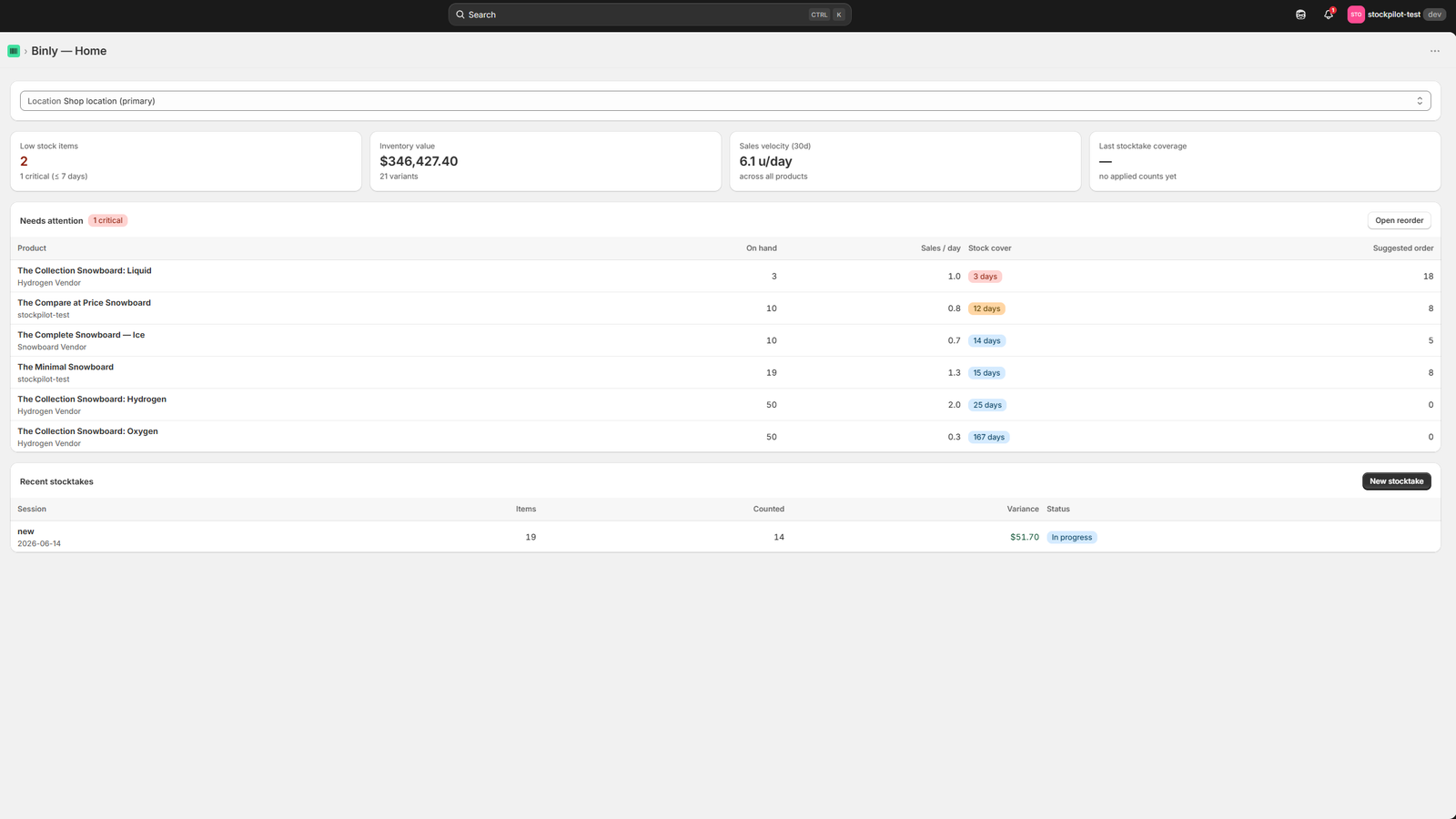
You can calculate sales velocity and days of stock by hand from Shopify's own reports. Binly's dashboard tracks both per product automatically, so slow movers surface without an export.
Click to enlarge
The Binly dashboard: stock levels and slow movers at a glance.
Clearing it
Three ways to actually move dead stock
Pick the tactic that fits how much margin you can give up and how fast you need the cash or the shelf space back.
Bundle it with a bestseller
Pair the slow mover with something that already sells well and price the pair as a set. Shoppers who wouldn't buy the dead stock item on its own will often take it as part of a bundle, with no visible markdown on its own product page.
Discount or flash-sale it
A time-boxed discount, a clearance collection, or an email to past customers gives shoppers a reason to buy something they weren't already looking for. Price it to actually move, a small markdown on something with zero sales rarely does much.
Give it away, or sell it wholesale
Turn it into a free gift over a spending threshold, a loyalty reward, or a referral bonus, or sell the whole batch to a liquidator or wholesale buyer for cents on the dollar. Either way, converting it to goodwill or cash beats it sitting on a shelf.
Preventing it next time
The real fix is reorder discipline, not another clearance sale
Clearing dead stock once is a cleanup. Not creating more of it is a habit built around what actually sells, not what you assume will.
Most dead stock traces back to the same decision: ordering a quantity based on a guess, a gut feeling, or last year's numbers, instead of how the product has actually been selling. A reorder point set from real sales velocity, and adjusted as that velocity changes, keeps you from buying six months of a size run that only needed six weeks. Reviewing slow movers on a schedule, not just when a big stocktake forces the issue, catches a bad buy after a few weeks instead of a few seasons. And being honest that a product simply isn't working, instead of reordering it out of habit, is often the cheapest form of prevention there is.
FAQ
Common questions
What is dead stock?
Dead stock, also called slow-moving or excess inventory, is any product that's stopped selling at a normal pace, or stopped selling altogether, while still sitting in your inventory. It's usually identified by a lack of recent sales, a low sell-through rate, or a high number of days of stock on hand relative to how fast it's actually moving.
How do I find dead stock in my Shopify store?
Pull products with no sales in the last 60–90 days, check sell-through rate (units sold ÷ units received) against your store average, and calculate days of stock (quantity ÷ average daily sales) for anything left. Products that fail all three are almost certainly dead stock.
How long before inventory counts as dead stock?
There's no universal cutoff, it depends on how fast the rest of your catalog turns. A store selling mostly staples might use 90 days with no sales as the threshold; a fast-fashion store might flag something at 30. The more useful test is relative: is this product moving dramatically slower than similar products in your catalog?
What's the fastest way to clear dead stock?
A time-boxed discount or clearance collection usually moves inventory fastest, especially paired with an email to past customers. Bundling with a bestseller works well when you don't want a visible markdown on the product page itself. For stock that still won't move, selling the batch to a liquidator or wholesale buyer converts it to cash immediately, even at a steep discount.
How do I stop creating more dead stock?
Base reorder quantities on actual sales velocity instead of a guess or last year's numbers, review slow movers on a regular schedule instead of only at a big annual stocktake, and be willing to stop reordering a product once the sales data says it isn't working.
See your slow movers without exporting a report.
Binly's dashboard tracks sales velocity and days of stock for every product automatically.
Start free 7-day trialNo credit card required